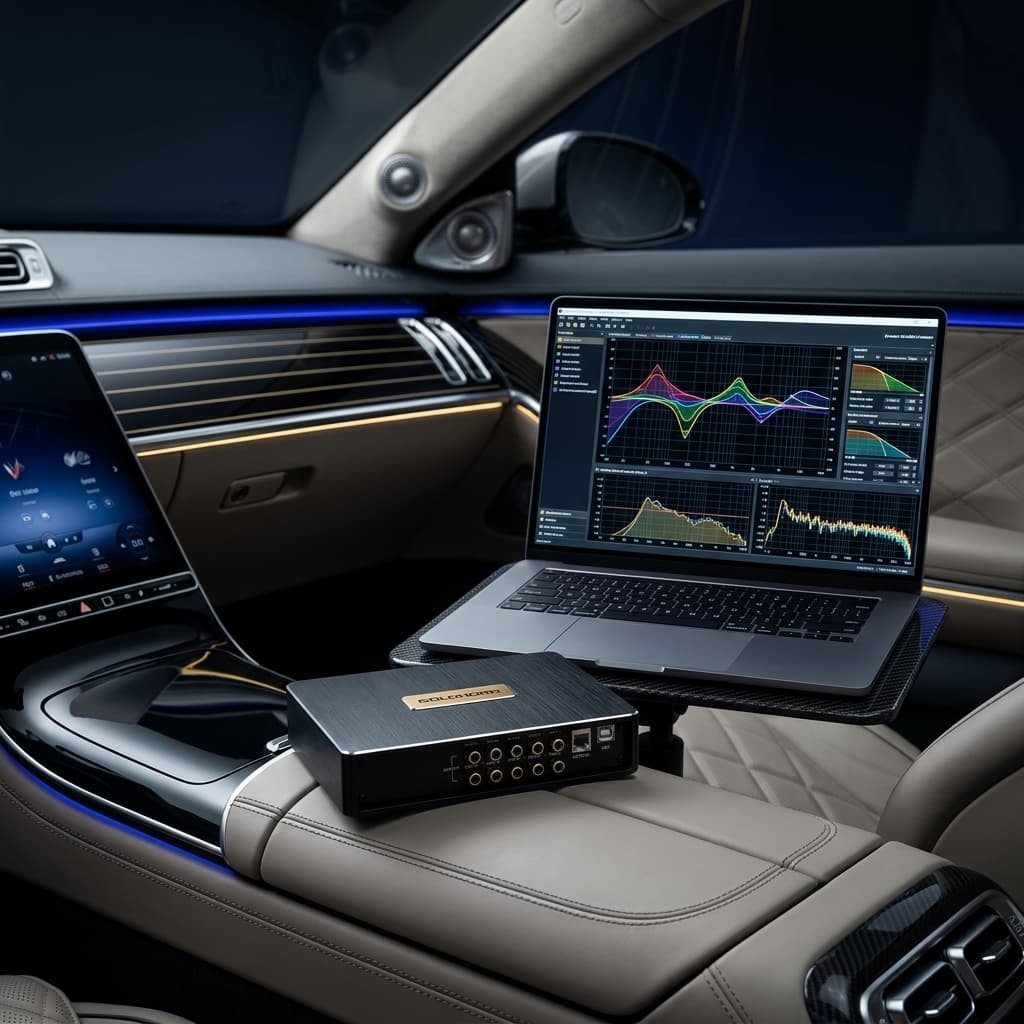
Unleashing the Power of Digital Signal Processing
Upgrading your car audio hardware is only half the battle. You can install the finest amplifiers, mid-bass drivers, and tweeters, but without proper calibration, they will never perform to their true potential. The acoustic environment of a car cabin is notoriously hostile: speakers are placed at unequal distances from your ears, glass surfaces reflect high frequencies, and door panels resonate. This is where a Digital Signal Processor (DSP) becomes the brain of your sound system.
Tuning a car DSP might seem intimidating, but by breaking it down into three core steps—Crossovers, Time Alignment, and Equalization (EQ)—you can achieve a breathtaking, concert-like soundstage right above your dashboard. In this guide, we will walk you through the fundamentals of tuning using Goldhorn’s high-performance standalone processors and user-friendly software.
Step 1: Setting Up Your Crossover Slopes (HPF & LPF)
Before sending any music to your speakers, you must protect them. A crossover acts as a filter, ensuring that each speaker only receives the frequency range it was designed to play. Tweeters can easily destroy themselves if they receive low-frequency bass notes, while subwoofers are highly inefficient at playing vocals.
When tuning crossovers in Goldhorn's software, you will select two key parameters for each channel: the Crossover Frequency and the Filter Slope.
- Butterworth: This filter type has a sharp knee and a flat passband. It is excellent for maximum power handling and efficiency, but can introduce a slight +3dB peak at the crossover frequency when combined with another speaker.
- Linkwitz-Riley (L-R): Widely considered the gold standard for active car audio setups. Linkwitz-Riley filters are designed to sum flat (0dB peak) at the crossover point when matched. A 24 dB/octave Linkwitz-Riley filter is the most common starting point for tweeters and mid-bass drivers because it provides excellent protection and phase coherence.
For a typical 2-way active front stage, a safe starting point is:
- Tweeters (High-Pass Filter): 3,000 Hz or higher with a 24dB Linkwitz-Riley slope.
- Mid-Bass (Low-Pass Filter): 2,500 Hz to 3,000 Hz with a 24dB Linkwitz-Riley slope; (High-Pass Filter): 80 Hz with a 24dB Linkwitz-Riley slope.
- Subwoofer (Low-Pass Filter): 80 Hz with a 24dB Linkwitz-Riley slope.
Step 2: Dialing in Time Alignment
In a car, you sit off-center. This asymmetrical seating position means the left tweeter is much closer to your left ear than the right tweeter is to your right ear. Because sound waves from the left speaker reach your ears first, the stereo image collapses, and the music feels like it is coming directly from the door or the pilar next to you.
Time alignment solves this by delaying the signal of the closer speakers by fractions of a millisecond. This ensures that the sound waves from every single speaker in the vehicle reach the driver's ears at the exact same instant, creating a centered, three-dimensional stereo image.
Here is how to configure it in Goldhorn's tuning software:
- Measure the physical distance from your listening position (usually the driver's headrest/ears) to each individual speaker in centimeters (cm) or inches.
- Enter the measured distances directly into the Goldhorn tuning software, or calculate the relative delays in milliseconds (ms). The software can automatically convert distance measurements to time delay.
- Use the farthest speaker (usually the subwoofer or front-right mid-bass) as the reference point (0 delay). The closer a speaker is, the more delay (in ms) it will receive. Goldhorn's flagship DSP16 Ultra offers ultra-precise adjustments with an incredible 0.005ms step delay, allowing you to focus the center image with microscopic accuracy.
Step 3: Sculpting the Sound with a 31-Band Parametric EQ
Once your crossovers are safe and your time alignment is set, it is time to correct the frequency response of the cabin. Glass reflects highs, causing harshness, while plastic and upholstery absorb mid-range frequencies, leaving them sounding thin. A 31-band Parametric Equalizer (PEQ) is the ultimate tool to smooth out these peaks and dips.
Unlike a graphic equalizer, a parametric EQ gives you control over three parameters for each of the 31 bands:
- Frequency: Select the exact frequency you want to adjust (e.g., 2,500 Hz).
- Gain: Choose how much to cut or boost the frequency (in dB). Tuning Tip: Always prioritize cutting peaks (attenuation) over boosting dips. Boosting frequencies can lead to amplifier clipping, distortion, and speaker damage.
- Q-Factor: Adjust the bandwidth of the filter. A high Q-value creates a very narrow notch to target a specific resonance, while a low Q-value creates a wide, smooth curve for broader adjustments.
Using a Real-Time Analyzer (RTA) microphone combined with Goldhorn’s real-time PC tuning software, you can measure the frequency response in your cabin and make instant adjustments to achieve a target curve, such as a smooth downward slope from bass to treble.
Unleashing Goldhorn Hardware and Software
To achieve professional-grade results, you need hardware with the processing power to execute these calculations without introducing noise. Goldhorn's standalone processors are engineered for audiophiles who demand the absolute best:
- Goldhorn DSP16 Ultra: Our flagship processor featuring three Analog Devices ADAU1463 DSP chips, two ESS Sabre ES9038Pro DACs, and a Femtosecond Clock System. With 16 channels of output and a signal-to-noise ratio of ≥118dB, it is the ultimate brain for active multi-channel systems.
- Goldhorn DSP10: A highly capable and compact 10-channel standalone processor utilizing the ADAU1452 chip, offering 31-band parametric EQ per channel and high-quality AD/DA conversion.
Both devices are fully compatible with Goldhorn's user-friendly PC and mobile tuning software, which you can download from our dedicated Software Page. The software allows you to tune in real time, save presets, and switch configurations on the fly.
Summary
Tuning a car DSP is a blend of science and art. By setting precise Linkwitz-Riley crossovers, dialing in time alignment down to the millisecond, and gently cutting peaks with a 31-band parametric EQ, you can transform your vehicle into a high-fidelity listening room. Start with safe values, trust your measurements, and use Goldhorn's software to fine-tune your way to audio perfection.